


We open an electronic case file to see how each act gets signed and linked, how it moves between offices, and how every step inside becomes a status the applicant can follow online.
An electronic case file is the record of a government procedure: every request, technical report, legal opinion and resolution, in order, each one signed by whoever is responsible for it. Applying for a construction permit, for example, opens one.
In earlier editions we looked at a single document inside that record: how a single act is stored, searched and verified in GDE2, the case file module of SovraGov, where each act is signed structured text and a PDF is produced only when someone asks for one. This edition looks at the case file as a whole: what it is made of, how an act enters it, how it travels between offices, and what the person who applied sees while all of that happens.
1. A sequence of signed acts
An administrative act is any formal step a public office takes: an order, a request for information, a technical report, a resolution. In GDE2 each act is a plain-text document with three parts: the content, a block of metadata (case number, office, date, signers, linked documents) and a detached signature stored alongside it.
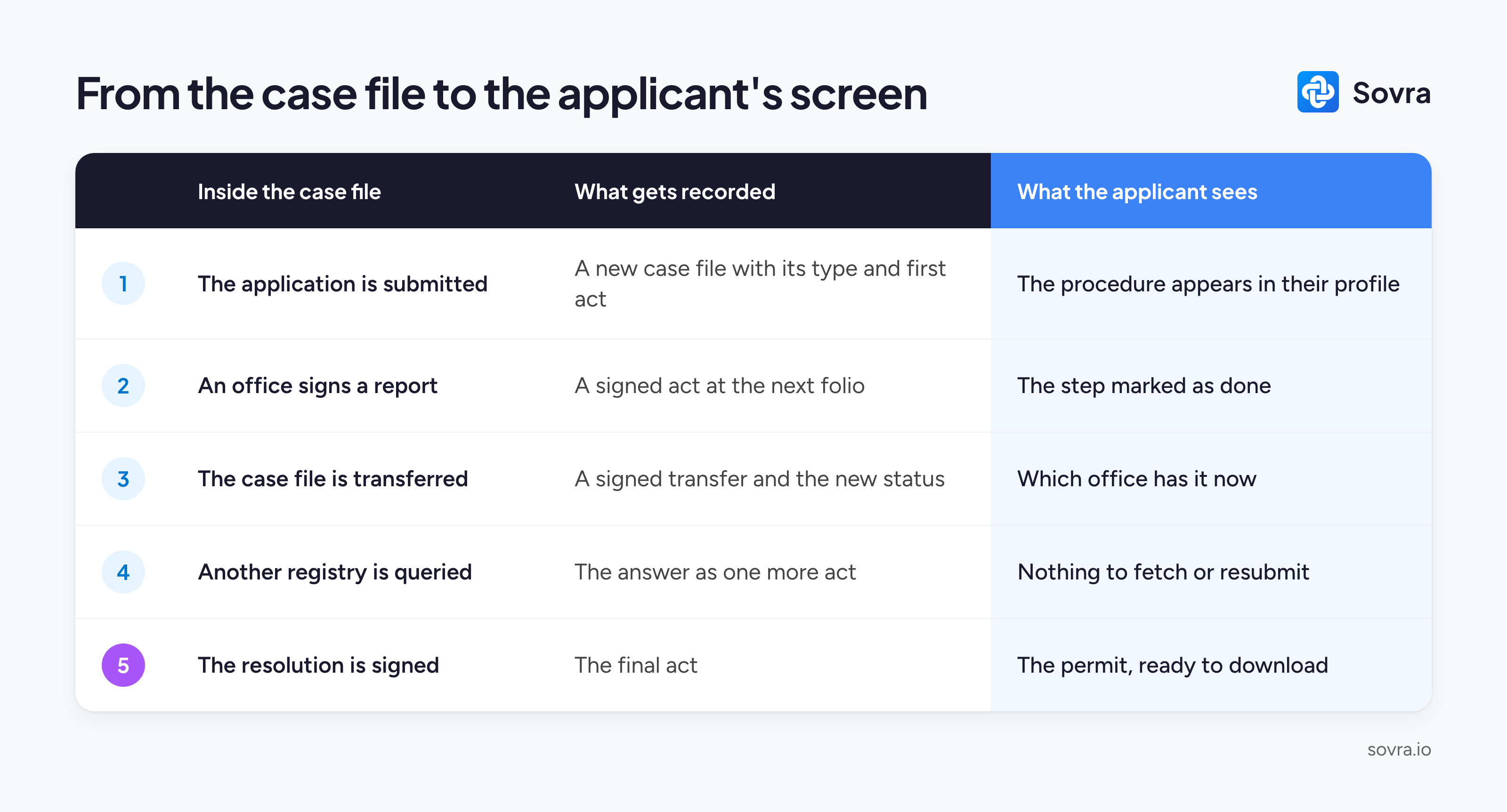
The case file is the ordered list of those acts. Each act takes the next position in the sequence, the folio, so the order in which things happened is part of the record and cannot be rearranged afterwards.
Case files also have a type. A public works tender and a construction permit follow different procedures, and the type of the case file defines which steps it has to go through before it can close.
2. How an act enters the case file
Officials draft acts from inside the case file they belong to, in the inbox where officials draft, review and sign: drafts, sent, to sign and signed, with templates, assigned reviewers and an audit trail of every step.
Signing runs the same way every time:
The text is canonicalized: line endings, character encoding and the order of the metadata are normalized, so the same content always produces the same fingerprint.
The system computes a SHA-256 hash of that text, a short fingerprint that changes completely if a single character changes.
The signer’s certificate signs the hash with CAdES, the European standard for advanced electronic signatures (ETSI EN 319 122), using the certification infrastructure the government already relies on.
At that moment the act is linked to its case file automatically, because it was born inside it. Nobody has to find the signed document later and attach it by hand. An official facing a signing queue of fifty documents can sign forty-nine and hold one back for review.
Digital signature laws across the region follow the UNCITRAL Model Law, which asks for integrity, authorship, a certification chain and traceability. We covered why legal validity lives in the signature over the content in June.
3. Transfers are acts too
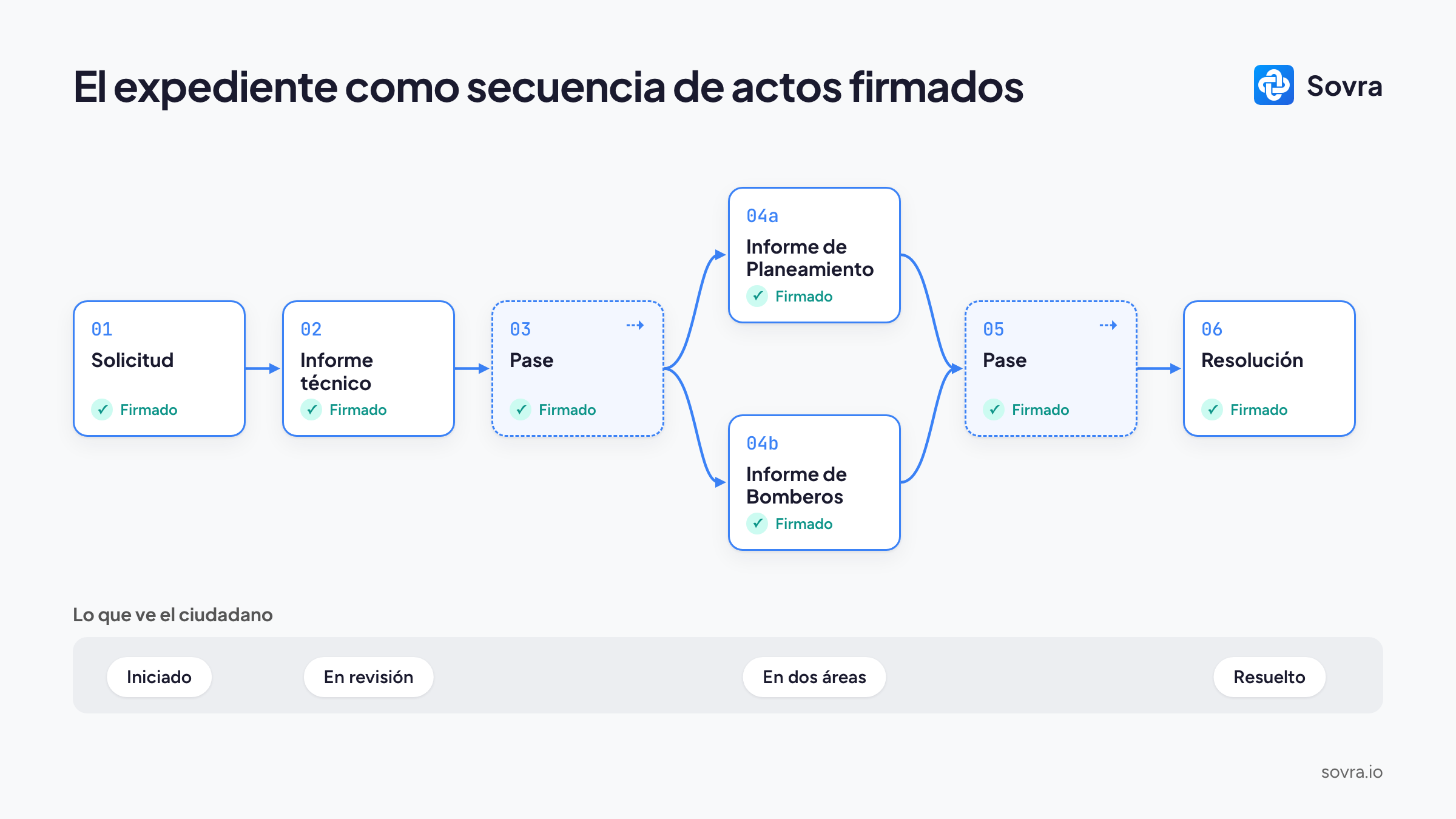
When a case file moves from one office to another, that movement is itself an act: the transfer, signed by whoever sends it and added to the sequence like any other.
Each operation runs as a single transaction: the act is written, the signature recorded, the audit entry created, the case file’s status updated and the transfer registered, all together or none at all. A case file can never end up sent without its transfer on record, or signed without its new status.
Two things follow from treating the transfer as data:
Parallel transfers. When two offices don’t need each other’s signature, the case file goes to both at once. Zoning and fire safety can review a construction permit in the same week.
A summary travels with each transfer. Because every act is text, the system drafts the note that summarizes the case file for the receiving office in seconds. An official reviews it before it goes.
When an office needs data held by another registry or institution, the case file module queries it through X-Road, an open data-exchange layer between government systems, and the answer enters the case file as one more act.
4. What the applicant sees
The applicant starts the procedure in the Single Window, SovraGov’s citizen portal, with an identity verified once. From then on, every change of status inside the case file is what their profile shows as the procedure’s history, in real time.
At the end, the permit can also arrive as a verifiable credential in SovraWallet, the citizen’s phone wallet, where it can be verified by anyone without contacting the issuer.
5. Case files that started on an earlier system
Governments adopt GDE2 gradually, with every new case file born in it from the first day. Case files opened before that keep their documents in their original signed format, readable from GDE2 by their original number.
When one of them receives its first new act, it is incorporated: its documents enter in their original order, the original signatures are verified, and the incorporation itself is recorded as an act inside the case file. Earlier documents are never converted or re-signed, so the signature a public servant placed years ago stays exactly as it was, and the sequence continues from the last folio.
Worth reading this week
ETSI EN 319 122: the CAdES standard, the signature format used on every act.
UNCITRAL Model Law on Electronic Signatures: the text behind most of the region’s digital signature laws.
X-Road: the open-source layer governments use so their systems can query each other.
CommonMark: the specification for the plain-text format each act is written in.
Keep reading
What Is an Electronic Case File and How Do You Implement One?: what an electronic case file is and how one gets implemented, in four steps.
Introducing Sovra GDE2 Case Files: the launch edition, with short product videos.
Continue the conversation
Our knowledge hub at sovra.io/knowledge explains digital signatures, verifiable credentials and electronic case files in plain language. To see a procedure go from application to credential, try SovraGov yourself.
Which step of a case file would you like us to open next? Reply and tell us. We read every response, and if a colleague works on records or digital government, forward this edition to them.
Subscribe to The Identity Brief, published every Thursday.
The Identity Brief is published weekly by Sovra, the Digital Identity Stack for the Institutional World.